The workspace
A five-region layout designed for long sessions — every panel collapses, resizes and remembers how you like to work.
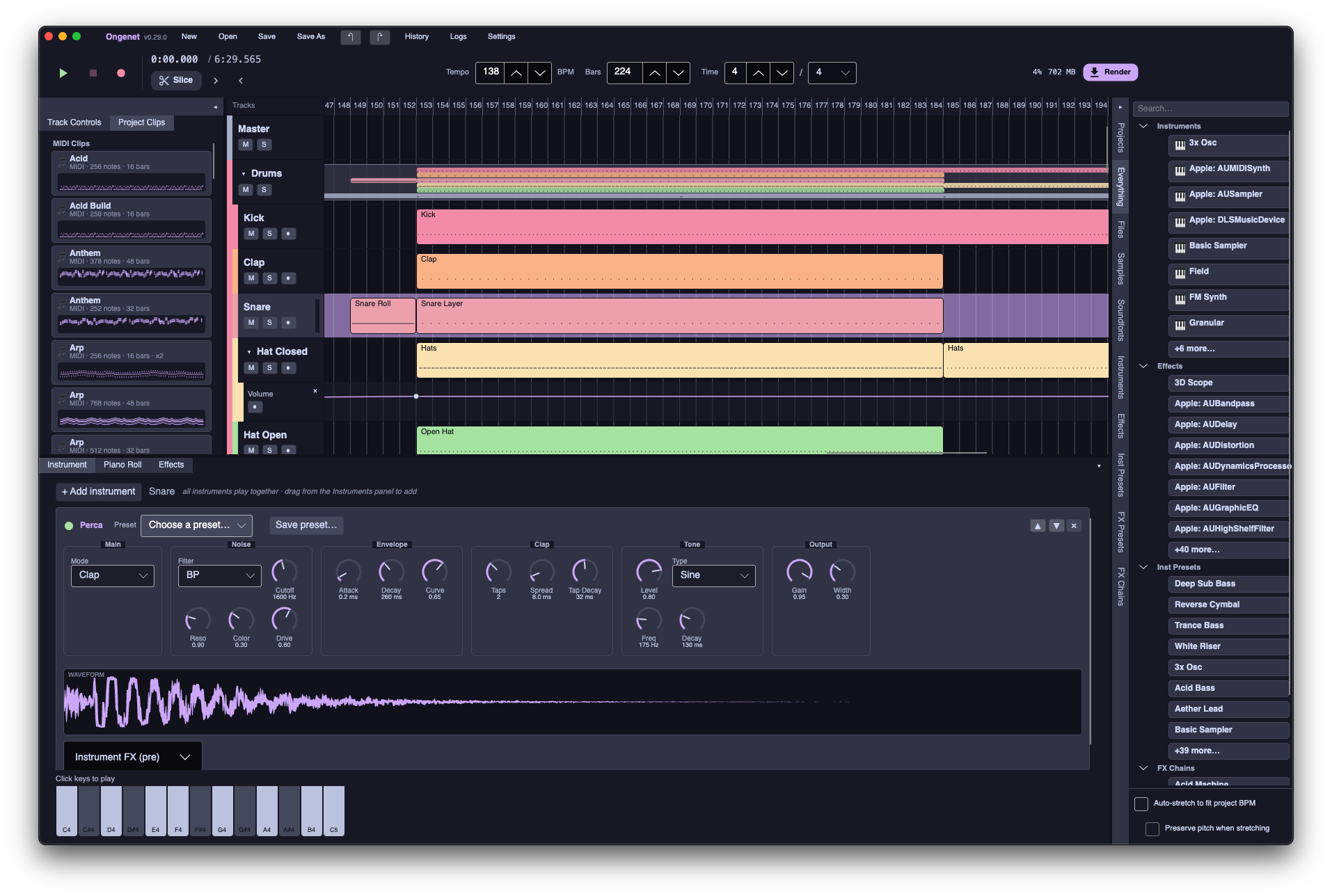
Everything in one window
Ongenet uses custom window chrome themed with Catppuccin, then divides the session into focused regions you can show or hide on demand.
- Title bar — New, Open, Save, Undo/Redo, History, Logs and Settings, plus a busy indicator during long operations.
- Transport bar — Play, Stop, Record, tempo, bars, time signature, offline Render and a stereo master loudness meter.
- Left inspector — Track Controls and Project Clips tabs; toggle with the ◂/▸ button.
- Centre timeline — The arrange view with bar ruler, track headers, clips and a moving playhead.
- Right library — Browser tabs for Projects (built-in demo songs), Files, Samples, Soundfonts, Instruments, Effects, Inst/FX Presets (your saved
.ongenpresetlibrary), and FX chains; starts collapsed to a tab strip. - Bottom editors — Instrument, Piano Roll and Effects tabs; drag the 4px splitters between regions to resize.
Timeline & arrangement
A scrolling, zoomable arrange view where MIDI and audio clips live side by side on colour-coded tracks — with grouping, automation and live metering built in.
Build the song on the grid
From a single kick lane to nested bus groups, the timeline scales with your project complexity.
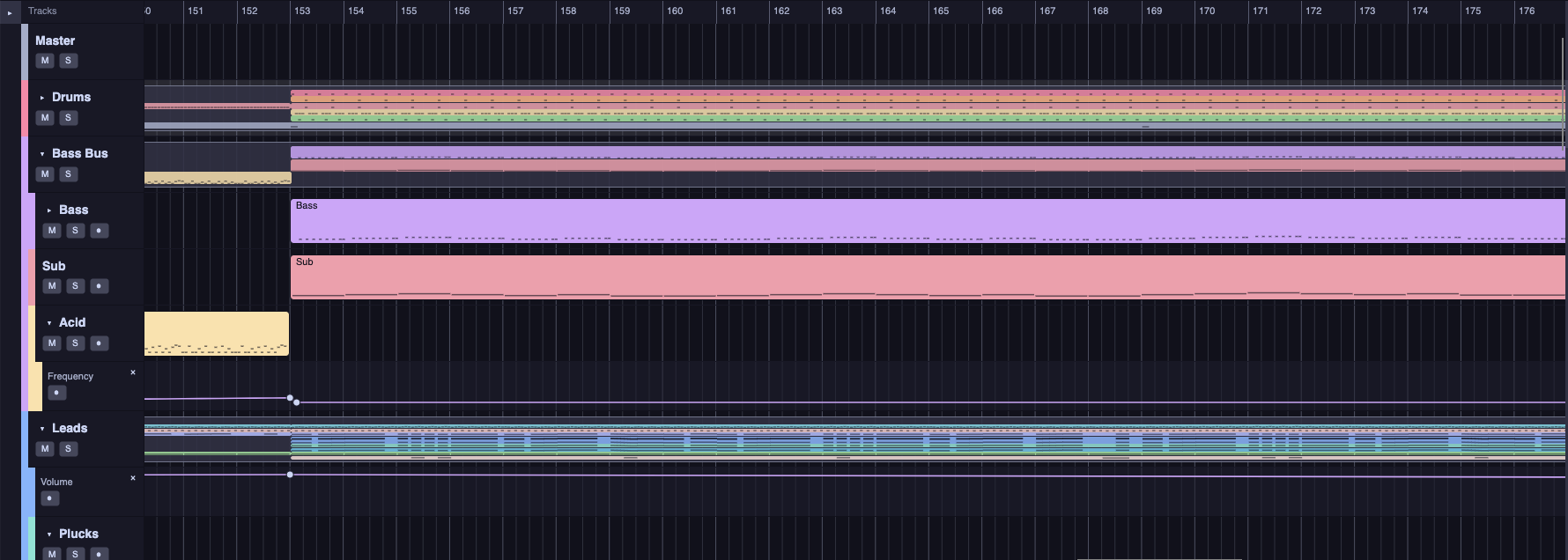
- Multi-track arrange view with MIDI and audio clips on a zoomable, snap-aware grid (bar / beat / ½ / ¼ / ⅛).
- Group tracks into bus tracks — fold drums, leads or FX stems behind collapsible headers with indented children.
- Per-track mute, solo, record-arm and constant-power pan; live peak metering on every track header.
- Automation lanes under tracks — add, drag and bend breakpoints; bound controls move live during playback.
- Drag-to-move, edge-resize and cross-track reparenting; Edit / Select / Slice tools, rubber-band multi-select, duplicate, reverse and slice.
- Render clip to new track — right-click any MIDI clip, audio clip or group summary to bake instrument racks, track FX and ancestor group buses into a perfectly sized audio clip on a fresh track below, with a live progress sweep across the source clip.
- Drop audio from the built-in browser or the OS — WAV decodes natively, other formats transcode via ffmpeg; loops auto-stretch to project tempo.
- Middle-mouse horizontal zoom around the cursor; clickable bar ruler, start marker and moving playhead.
Mixer & sends
A dedicated mixer view with channel strips, live metering and auxiliary sends to return buses — with plugin delay compensation so every path meets the master in phase.
Mix like a console
Switch from the arrange timeline to the Mixer tab for a strip-by-strip overview of the whole project — groups, returns and the master included.
- Per-track volume, constant-power pan, mute and solo with peak metering on every strip.
- Aux sends — pre- or post-fader taps into return tracks for parallel reverb, delay and FX.
- PDC — latency-reporting plugins are delay-compensated automatically on live playback and offline export.
- Return buses run their own insert chains and sum back into the group/master tree.
- Sidechain ducking and vocoder carrier reads remain separate cross-track taps (not sends).

Session view
An Ableton-style clip launcher for live performance and loop-based writing — with Arrangement, Session-only and Hybrid playback modes.
Launch clips on the grid
Session clips reference arrangement clips and fire with Trigger, Gate, Toggle or Repeat launch modes. Scene columns launch every track at once.
- Clip grid aligned to tracks and scenes; launch quantize snaps starts to the beat grid.
- Hybrid mode plays the timeline arrangement while session clips overdub on top.
- Stop individual clips, whole tracks, or everything with one click.
- Same engine path as the timeline — sends, PDC, automation and plugin hosting all apply.

Piano roll
A full-featured note editor with its own toolbar, music-generation tools and editing modes shared with the timeline.
Notes, chords and arpeggios
The piano roll pairs a pitch ruler and bar grid with tools that speed up composition — from hand-rolled MIDI I/O to algorithmic chord and arpeggio helpers.
- Note CRUD with snapping, a "last length" pen, multi-note relative move & resize, and note slicing.
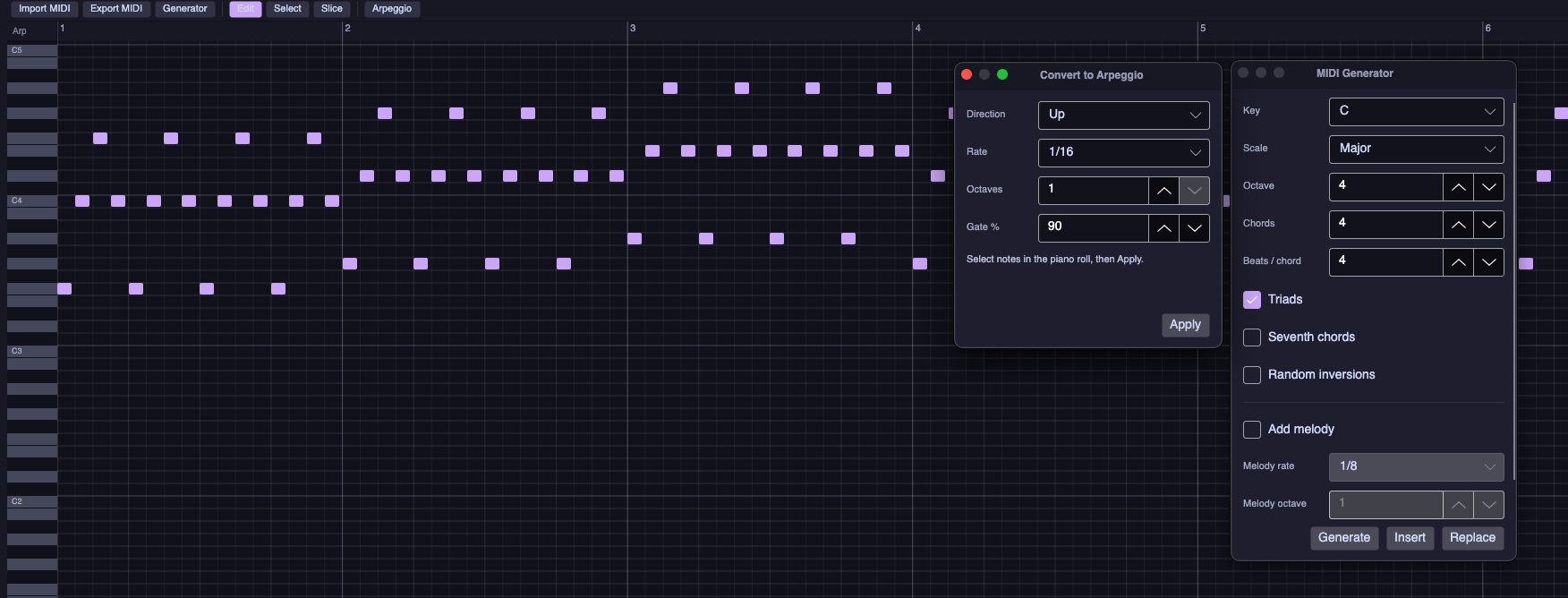
- Toolbar: Import MIDI, Export MIDI, Generator, Edit / Select / Slice and Arpeggio — hand-rolled Standard MIDI File support, round-trip exact.
- Chord progression generator — pick key and scale, chord count and length; triads, sevenths, random inversions and an optional melody overlay.
- Arpeggio converter — select notes, then apply direction, rate, octaves and gate % to turn chords into patterns.
- Live instrument preview while editing; middle-mouse zoom; the same edit tools as the timeline.
Field
A patchable node-graph instrument and effect — wire oscillators, filters, modulators and even whole plugins together on a zoomable canvas.
The grid, built in
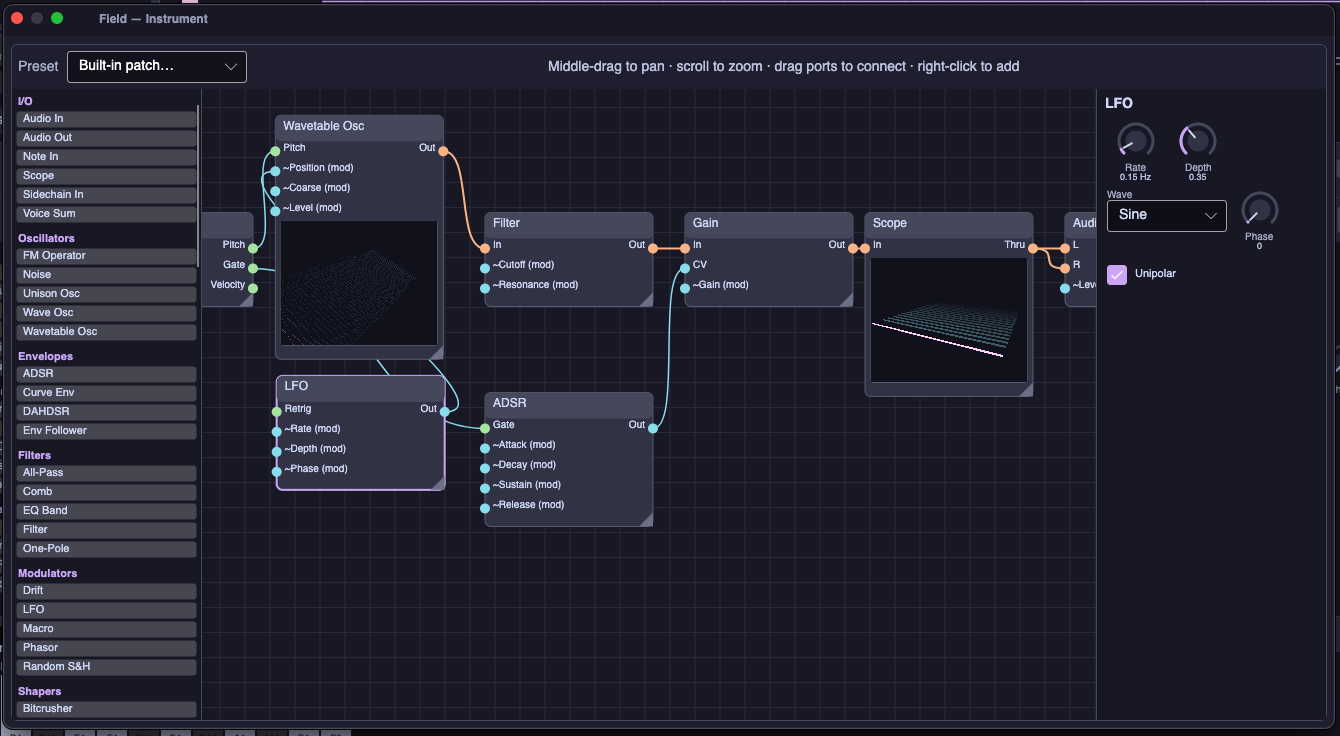
Field ships as both an instrument and an effect, sharing one engine. Built-in presets reconstruct every other instrument as an editable graph you can tear apart.
- Module library — I/O, oscillators, envelopes, filters, modulators, shapers, math and wrappers for every built-in instrument, effect and plugin.
- Colour-coded wires for audio, CV and note signals; middle-drag to pan, scroll to zoom, drag ports to connect, right-click to add nodes.
- Every knob gains a CV modulation inlet — patch LFOs, envelopes, macros or any other output into any parameter.
- Per-node inspector with knobs and switches; Wavetable Osc and Scope nodes embed live 3D previews.
- Polyphonic voice/global graph partition — per-voice oscillators and envelopes, global post-mix FX; safe live recompile while playing.
- Asset ports carry soundfonts and wavetables between nodes without touching the audio thread.
Effects & mixing
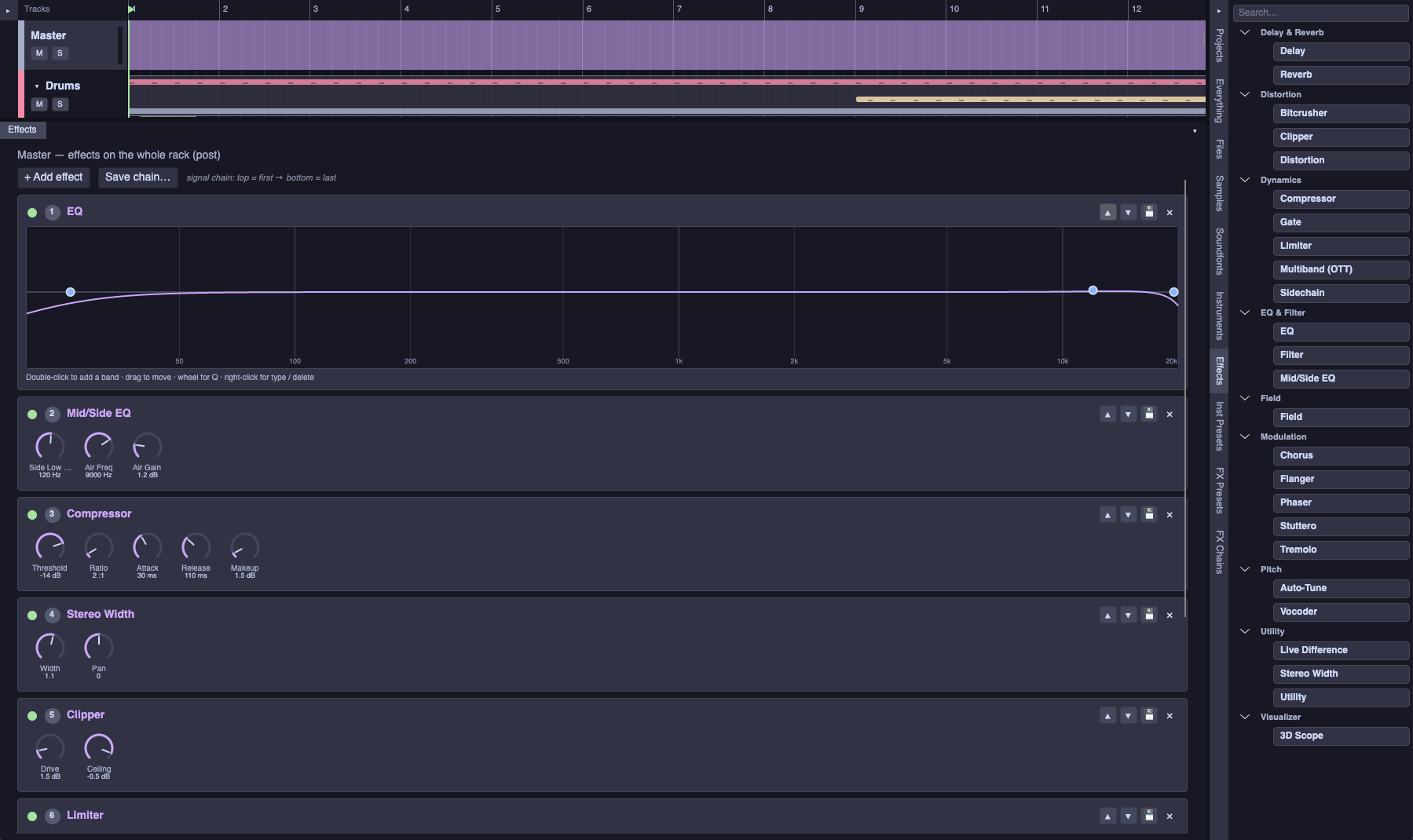
Per-track and master effect chains with visual editors, live bypass and a searchable browser — twenty-five built-ins plus your plugin collection.
Chains that scale from track to master
Signal flows top → bottom through reorderable effects. Save a chain as a preset, bypass any module with one click, and drag new processors in from the library sidebar.
- Visual parametric EQ — double-click to add bands, drag to move, scroll for Q, right-click for filter type; Mid/Side and Match EQ for stereo polish and reference matching.
- Dynamics — Compressor, Limiter (bus), Gate, De-Esser and a dedicated Sidechain effect with tempo-synced and track-keyed ducking.
- Mastering — Peak Limiter, Clipper, Multiband (OTT), Spectrum, Loudness Meter and delivery-oriented factory chains.
- Modulation — Chorus, Phaser, Flanger, Tremolo and Stuttero, our Stutter Edit-style performance processor.
- Utility & visual — Utility, Live Difference, Tuner and the GPU-powered 3D Scope pass-through visualizer.
- Effects browser grouped by category; CLAP, LV2, VST2, VST3 and AU audio effects slot in under Plugins alongside built-ins.
- Per-track strips feed group buses and the master; mute, solo, pan and metering stay audible in live play and offline export.
Instruments
Twenty-four built-in instruments ship in the core, plus Field. Any CLAP, LV2, VST2, VST3 or AU instrument you have installed is discovered at runtime and appears right alongside them.
Oscillator
Polyphonic single-oscillator synth — one waveform per voice, shaped by an ADSR envelope.
3× Osc
Triple-oscillator subtractive synth in the spirit of FL Studio's 3x Osc: three oscillators, each with its own waveform, coarse/fine tuning and phase offset.
Wavetable
Morphing wavetable synth — scan tables with position and unison, load samples as custom tables, pick from built-in presets and preview the 3D wavetable in the inspector.
FM Synth
Two-operator FM — a sine carrier phase-modulated by a sine modulator with adjustable ratio and index, ADSR-shaped.
Padda
Lush pad synth — two fat unison layers plus a sine sub and noise through a modulated resonant filter, finished with an internal chorus → delay → reverb chain. Ships an init patch and five presets.
Basic Sampler
Plays one loaded audio sample pitched across the keyboard (resampled around C4), with an attack/release envelope.
Granular
Continuously spawns short, overlapping windowed grains from a moving playhead over a loaded source sample.
Sampler
Multi-sample SFZ engine — load any .sfz patch and it maps notes and velocities
across regions with velocity layers and round-robin, each voice with its own envelopes
and filter.
Kicka
Kick-drum synth from clean drumkit thumps to hardstyle screams — a transient "tok" plus a pitch-swept, distortion-stacked tail over a clean parallel sub, with the low end kept mono.
Perca
Noise-percussion synth for claps, hi-hats and snaps — the companion to Kicka, with mode-specific shaping for transient detail and stereo width.
Field
Modular node-graph instrument — patch any combination of oscillators, filters, modulators and module-wrapped plugins. See Field above.
CLAP, LV2, VST2, VST3 & AU Plugins
Third-party .clap, .lv2, VST2, .vst3 and macOS AU instruments are
scanned at startup and hosted directly — including their native plugin GUIs — with no extra setup.
Built-in effects
Ninety built-in effects, organised by category and chainable per track in any order. CLAP, LV2, VST2, VST3 and AU audio effects slot into the same chain.
EQ & Filter
Mastering
Dynamics
Modulation
Delay & Reverb
Distortion
Pitch
Utility
Visualizer
Modular
Plugins
More features
Everything else that makes a session productive — built on a lock-free audio engine with sample-accurate sequencing.
Channel rack & step sequencer
Pattern-based drum and melodic programming in the spirit of FL Studio's channel rack.
- Channel rack — overview of pattern channels with per-channel mute and pattern selection.
- Step sequencer — edit steps per channel; pattern clips on the timeline expand into MIDI via the pattern scheduler at playback time.
- Patterns are shared objects — one pattern can drive multiple instrument tracks through channel routing.
Offline export
Bounce the mix faster than real time from the transport bar Export button.
- Master mix, per-track stems, or a beat region — WAV, FLAC, MP3, or OGG (16/24/32-bit where applicable).
- Named arrangement markers can define export regions; optional ffmpeg video mux.
- 5.1 / 7.1 surround offline; live 5.1 monitoring (6+ channels) and 7.1 (8+ channels).
- Honours automation, aux sends, plugin delay compensation, sidechain and effect tails.
- Project-wide Standard MIDI File export from the transport bar.
Modern open-source desktop DAW
Ongenet is a broad, engine-backed OSS DAW for beat-making, songwriting, vocal tuning, hybrid arrange/session work, and Field modular synthesis on Linux, Windows and macOS.
- Production: hybrid arrange/session, comping, ripple edit, bounce in place, track freeze, polyphonic pitch editor, standalone audio editor, C# scripting, logical MIDI edit, audio-to-MIDI, tap tempo, section playlist, autosave recovery.
- Mix & export: immersive surround panning, input monitoring, routing matrix, timeline XML handoff, stems/regions/surround offline, collaboration folder sync.
- Creativity: Field modular engine, Stuttero, step micro-timing, user groove pool, track modulators, nine built-in song templates.
- Pro I/O: CLAP/LV2/VST2/VST3/AU hosting with PDC and optional VST3 effect crash isolation; WASAPI exclusive mode; MIDI clock output; expression maps; control-surface learn; screen-reader labels; ADM BWF immersive export and timeline XML handoff for post pipelines.
Audio Editor & pitch editing
Edison-class standalone sample editor plus built-in VariAudio-class polyphonic pitch correction — no third-party Melodyne required.
- Audio Editor — multitrack lanes, cut/copy/paste, spectral overlay, normalize, fades; open from View menu or clip context menu.
- Pitch Editor — analyze note segments, drag pitch per blob, real-time crossfaded playback; flatten to new audio clip.
Scripting & plugin isolation
Extend the DAW with C# automation scripts and optionally sandbox VST3 effects in a child process.
- Scripting tab — Roslyn host with curated project/transport API; factory scripts for tempo, rename, and quantize.
- Plugin isolation — Settings → General → Plugins;
Ongenet.PluginHostchild process for crash-safe VST3 effects.
Ableton Link
Sync tempo and phase with other Link-enabled apps on the same network.
- Implemented in the isolated
Ongenet.Linkassembly (GPL) so the core app stays MIT-licensed. - Degrades gracefully to a no-op when the native Link library is not present.
Sidechaining
A dedicated Sidechain effect with two ducking modes, driven by a lock-free cross-track signal bus.
- Tempo mode — a tempo-synced ducking pump retriggered per note division (1 bar → 1/16, incl. triplets), with adjustable amount, attack and release.
- Track mode — envelope-follower ducking keyed from any other track or group (so a whole drum group can be the trigger).
- The same cross-track signal tap powers the Vocoder, whose carrier is read from another track.
- Fully honoured on offline export, not just live playback.
Stuttero
A real-time stutter / beat-repeat performance effect in the spirit of Stutter Edit — our own, built right into the effect chain.
- Captures incoming audio and chops it into tempo-synced slices, from 1/4 all the way down to 1/512.
- A drawable per-slice gate curve shapes each repeat, routed through a reorderable multi-FX rack — tape-stop, lo-fi, comb, phaser, chorus and low-pass.
- Gestures bundle the settings plus time-variant curves (stutter-rate sweep, filter cutoff, per-module depth) that you draw and trigger.
- Fire gestures automatically from the transport, or play them from mapped MIDI keys, with a hold-to-freeze buffer.
Automation
Automate any knob, slider or switch over time with editable curves.
- Right-click almost any control to create an automation lane; lanes appear as collapsible rows under their track.
- Editable curves — add, drag and delete points, bend segments between them, and watch bound controls move live during playback.
- Record automation in real time by arming a lane and moving the control while the transport rolls.
Recording & performance
Capture MIDI and audio with a familiar arm → count-in → record flow.
- Per-track arm, a one-bar metronome count-in, and clips that grow live on the timeline as you play.
- Audio-track input recording with a live-drawing waveform; per-track software input monitoring (Off/Auto/On).
- Independent input/output device selection (mono or stereo).
- Play instruments live from a hardware MIDI controller, the on-screen keyboard, or an FL-style computer-keyboard layout.
- Optional input quantize snaps recorded notes to the grid (1/4 … 1/32, including triplets).
- Transport Tap button sets BPM; optional MIDI clock output in Settings → Audio.
MIDI controllers
Full hardware MIDI support on every platform, with no extra dependencies — each OS's native MIDI API is driven directly.
- Cross-platform input — the ALSA sequencer on Linux (works with PipeWire, JACK, USB, software and Bluetooth MIDI), WinMM on Windows, and CoreMIDI on macOS.
- Play & record — perform the selected instrument live with velocity, and capture into MIDI clips with optional input quantize.
- MIDI learn — right-click any knob, slider or switch and wiggle a control on your device to bind a CC to it; mappings save with the project and survive undo / redo.
- Transport & expression — map pads or buttons to play-pause, stop and record; pitch bend, mod wheel, sustain and aftertouch reach the instrument.
- Device, mappings and live input activity all live in the Settings window; your choice persists to the standard per-OS config location.
Tempo-synced samples
Loops lock to the project grid automatically.
- Detects a sample's natural BPM from its name/folder or by onset analysis, then time-stretches it to the project tempo with half/double octave snapping.
- Synced loops re-fit live when you change the project tempo; one-shots and recordings are left at native length.
- A contextual Sample inspector lets you override the natural BPM and toggle stretching per clip.
Plugins — CLAP, LV2, VST2 & VST3
Host your existing plugin collection. Every format is implemented from scratch — direct ABI interop, no wrapper libraries and no Steinberg SDK — and discovered at startup from the standard per-OS locations.
- CLAP, LV2, VST2 and VST3 instruments appear in the Instruments tab; audio effects slot into any track's effect chain under Plugins.
- Plugin parameters are exposed as native, automatable controls — and respond to MIDI learn like everything else.
- Native plugin GUIs open in their own window, embedded for you (on Linux the UI is hosted in a GL-compatible X11 surface so even heavyweight UIs like Cardinal / VCV Rack render correctly).
- The LV2 host ships a hand-written Turtle/RDF bundle scanner and supports the URID-map, Options and Worker extensions, so sampler- and engine-class plugins load too.
- The VST3 host speaks the COM-style factory/component/processor/controller model directly — process buses, note & parameter event lists, state transfer and the
IPlugVieweditor — cross-platform on x64 and arm64. - Nothing is bundled or required — if you have no plugins installed, Ongenet runs exactly as before.
Render clip to new track
Flatten a clip in place — instruments, slot pre-FX, track post-FX and ancestor group buses — without leaving the arrange view.
- Right-click any MIDI clip, audio clip or group summary on the timeline and choose Render clip to new track.
- The offline renderer applies the full rack chain (slot pre → track post → nested group FX, excluding master) with automation honoured, then places a beat-aligned audio clip on a new track below.
- Group summaries render every descendant track in the mix — child effects, the group bus and any parent group FX — onto a track outside the group, below the whole subtree.
- A progress sweep animates across the source clip while rendering so you can see how far through the bounce you are.
Themes, history & projects
The conveniences that make a session pleasant to live in.
- Live theming — 26 semantic tokens across Mocha, Macchiato, Frappé and Latte, a built-in theme editor in Settings and JSON import/export, all applied without a restart.
- Undo / redo — snapshot-based history with a jump-to-any-point History window (Ctrl+Z / Ctrl+Y).
- Single-file projects — the
.ongenformat bundles everything (samples de-duplicated) in one version-tolerant file. - Offline export — render the whole arrangement to a WAV faster than real time, with automation, sends, PDC, sidechain and effect tails honoured.
- Built-in projects — nine code-generated demo songs and templates under Library → Projects (First Light, Undertow, Ascension, Dust & Vinyl, House Starter, Static Bloom, Techno Starter, Trap Beat, Field Modular), or New ▾ in the title bar.
- Inst / FX Presets — your saved instrument, effect and chain presets as
.ongenpresetfiles (including factory material copied into the user preset folder on first run).
Get Ongenet
Free and open source under the MIT licence — no runtime to install, no paywall, no account required. Self-contained builds for Linux, Windows and macOS are published on GitHub Releases; the full source is on GitHub for anyone to audit, fork or contribute to.
⬇ Go to downloads